

4.11. 3D Similarity Screening
ADMET Predictor provides functionality to compute 3D similarity scores between one or more reference conformers and those contained in an existing 3D conformer database.
Similarity scores are composed of two separate terms, one based on atomic volume overlap and one based on pharmacophore feature overlap. Users can adjust the relative importance of the two terms. The feature term is based on a set of pharmacophore features specified by the user in the form of an input query file (*.cqf). The default file provided by ADMET Predictor is called Features3D.cqf and contains queries for hydrogen bond donors and acceptors, formal positive and negative charges and ring systems. Users can add or modify feature definitions by providing appropriate SMARTS queries; see the Query Formats section for syntax requirements.
Overlap volumes are approximated using atom-centered gaussians, as described in the article by Grant and Pickup (Grant 1995). Feature overlaps are computed similarly, but with gaussians positioned at the feature centroids.
Given two 3D conformers in arbitrary relative orientations, the similarity between them is computed as follows. First, a small number of starting rigid alignments is computed based on their principal axes. Users can adjust a setting to determine the number of such initial alignments, which varies from 4 to 28. Using each initial alignment as a starting point, an optimization algorithm is used to find the rigid alignment that maximizes the sum of volume and feature similarities. Reported similarities are Tanimoto scores of the form
T = S / (A + B - S)
where S is the similarity between the reference and database conformers, A is the similarity between the reference conformer and itself, and B is the similarity of the database conformer and itself.
Tanimoto similarities are always in the range of 0 to 1, with larger values indicating higher similarity.
To initiate a 3D similarity screening, select one or more spreadsheet compounds for which 3D coordinates are available, then use the menu item LIBRARY >> 3D >> Search By Similarity. The following options window will appear.
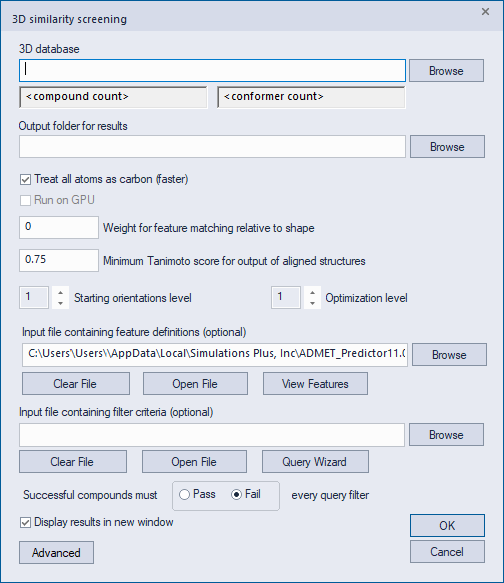
The first option is the folder containing the 3D database against which the screen will be performed. Once a valid folder is selected, the gray boxes below the folder path will indicate the number of compounds and conformers contained in the database. The second option is the Output folder for writing the screening results. This folder must already exist. If it is not an empty folder, the existing contents will be deleted automatically when the screen is performed.
Checking the box labeled "Treat all atoms as carbon" causes all atoms to be treated as carbon for purposes of computing the volume overlap. This results in a significant speed improvement at the expense of slightly less accurate volume approximations. The "Run on GPU" box can be used to perform the similarity calculations on a compatible Nvidia graphics processing unit (GPU), resulting in significantly faster run times. This option will be grayed out and inactive if no compatible GPU is detected. Please ensure that your graphics card has a CUDA compute capability of at least 5.2 and that your Nvidia drivers are up to date. The menu item HELP >> View Computer Information will display the CUDA compute capability of any detected Nvidia GPU.
The "Weight for feature matching" option is the numeric weight assigned to the feature component of the similarity score, with 0 indicating that only the volume term should be used, and 1 indicating that volume and feature terms should contribute equally. This value must be between 0 and 100. The box labeled "Minimum Tanimoto score" provides the minimum Tanimoto similarity such that ADMET Predictor will save an SD file representing the best alignment of the reference and database conformers. The value must be between 0 and 1, with the one caveat explained below. When screening large databases it is best that this number not be set too low, since a large number of saved SD files will require a significant amount of disk space. Note that Tanimoto similarity scores will generally decrease on average as the weight assigned to pharmacophore features is increased, so the value used for the minimum Tanimoto score should be adjusted to account for the particular weight assigned to the feature score. Starting with ADMET Predictor version 13, a Minimum Tanimoto Score greater than 2 will be interpreted as the number of highest-similarity alignments to save, regardless of the actual similarity values.
The "Starting orientation level" option controls the number of initial alignments between the reference and database conformers. Lower values indicate fewer alignments, resulting in faster run times. The "Optimization level" option controls the degree of optimization used to find the best rigid alignment, with lower values indicating less optimization and faster runs.
The feature-definitions option allows you to specify a query file (*.cqf) containing pharmacophore feature definitions. The default file called Features3D.cqf is provided as part of the ADMET Predictor installation, as described above. Clicking the View Features button will show a separate graphical window indicating the feature locations on the first of the selected reference compounds. The subsequent filter-criteria option allows you to specify a secondary query file containing filter rules. If specified, database compounds will be rejected if they violate any of the filters.
Once the similarity screen is complete, the output folder will contain a text file named scores.txt that lists the Tanimoto similarity score of each reference conformer against each database compound. Note that the multiple conformers of each database compound yield only a single score for each reference conformer: namely, the one conformer yielding the maximum similarity. This means that the number of similarity scores will be the number of reference conformers times the number of compounds (not conformers) in the conformer database.
If any similarity scores are above the threshold provided in the options dialog, the output folder will contain an SD file named results.sdf with the corresponding database conformers in their optimal alignments. For each record in this SD file, a link is provided to a separate SD file containing the reference and database conformer such that the optimal overlay can be visualized. If you open the file results.sdf using ADMET Predictor, the links can be clicked to display the overlays automatically.
Starting with ADMET Predictor 13, the query file defining pharmacophore features allows an extra field for each feature. The following is an example illustrating the syntax:
QUERYDATA r=1.5 w=5.0 i=+HAcc,-HDon
The -r field specifies the feature radius, used in computing the overlap volume as described in Grant 1995. The radius must be between 0.1 and 10.0 The -w field specifies the feature weight, which overrides the overall feature weight described above. The weight must be between 0.0 and 100.0. The -i field can be used to specify interactions with other features. In the example above, the feature being described interacts positively with the HAcc feature (i.e., proximity increases the similarity score) and negatively with the HDon feature (proximity decreases the similarity score).
ADMET Predictor 13 also introduces an excluded volume feature. The following illustrates how to add an excluded volume to the feature definition file.
QUERYNAME ExVol
QUERYDATA r=1.5 w=1.0
SLQ [U]
The feature name must be ExVol, while parameters in the QUERYDATA line can be adjusted as desired. The final line defines a SMARTS pattern used to identify the one or more excluded volumes that you add to the reference 3D structure(s). In the example above, excluded volumes are represented by Uranium atoms, but any unique atomic element will suffice.
During similarity screening, an atom from a database conformer that is in close proximity to an excluded volume from the reference conformer will contribute negatively to the score. The functional form describing the interaction is the same as for the atom and feature interactions described earlier.