

4.5. Keys
Starting from version 9.0, ADMET Predictor now allows users to generate a special class of descriptors, or keys, for an arbitrary set of compounds. Unlike the more complex modeling descriptors offered by ADMET Predictor, keys are usually based on substructure queries. Common examples of such keys are Extended-Connectivity Fingerprints (ECFPs) or arbitrary substructure queries defined by the user in an external file. These and other types of keys can have a number of uses, including SAR elucidation, model building, similarity/diversity analysis, and clustering, or the keys can simply be exported for use in another data-mining software application. Moreover, the new ADMET Predictor Keys tab lets you visualize keys via structural highlighting in the context of the input compounds, so that important information can be quickly browsed and queried.
The methods for key generation in ADMET Predictor generally fall into one of two categories, known as static and dynamic key generation. Static key generation uses a fixed list of keys that is known prior to beginning the generation process. Examples of this category include fixed lists of substructure queries or of properties such as molecular weight, numbers or rings, etc. Dynamic key generation does not begin with a fixed list, but rather identifies keys “on-the-fly,” using a search of each compound. Examples of this category include ECFP keys, keys comprising all unique ring systems, etc. Here, the number of generated keys will not be known ahead of time, and will depend on the number and characteristics of the input compounds, the particular type of key requested and any user-specified parameters. For all dynamic key methods, the final list of keys is guaranteed to be unique: even if a given key is identified in more than one compound, it will appear only once in the final list.
The result of both static and dynamic key generation is a key matrix, with the input compounds comprising the rows and individual keys comprising the columns. The interior of the matrix contains key values, numbers that provide a score for a particular key/compound pair. The precise meaning of key values depends on the type of keys generated. For example, a substructure-based key will yield the number of times the substructure is found in the compound, while a property-based key will yield the property value of the compound. Note that for all dynamic key methods, the key value is always either one or zero, indicating presence or absence, respectively, of a particular key. This is a fundamental difference between static and dynamic methods, resulting from the use of a fixed-query approach in the former case and an iterative-search approach in the latter.
This section describes the various methods available for key generation. All methods require that the Compounds tab be activated, where key generation is initiated using the menu item
CHEMISTRY >> Generate keys
or the corresponding toolbar button.

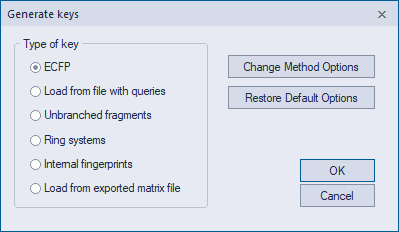
This launches the Generate keys dialog, from which the various generation options can be selected.
Once keys are generated, they can be visualized by activating the Keys tab. When the Keys tab is activated, a KEYS menu will appear in the main menu bar. This menu provides a number of different options for further analysis of the keys.