

4.5.3. Key Generation Methods
To generate keys, activate the Compounds tab and use the menu item CHEMISTRY >> Generate Keys, or click the corresponding toolbar button. The subsequent dialog, called Generate keys, then allows you to choose the type of keys to generate and to modify default options. To modify options related to the selected key method, click the Change Method Options button.
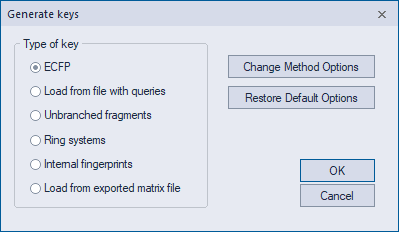
Most of the key generation methods have identical counterparts used for generating classes, and these are described in the section of the manual called Class Generation Methods. Note that the method called Ring systems is equivalent to the Ring-Anchored Systems method of class generation, while Unbranched fragments is equivalent to Chain-Anchored Systems. Methods not covered in the section on class generation are described below.
ECFP
Extended-Connectivity Fingerprints (ECFPs) are circular topological fingerprints generated by a graph search of each compound. Originally proposed by David Rogers and Mathew Hahn (Rogers, 2010), these types of keys are now widely used for a number of diverse cheminformatics applications. ADMET Predictor’s implementation of ECFP keys does not use "wildcarding" by default, so the keys are more restrictive than those in the original ECFP implementation. However, there is an option to allow the outer layer of atoms to be partially wildcarded; to activate this option, check the box labeled Use wildcard atoms for the final layer of each key on the ECFP options dialog. Checking the box results in the SMARTS labels [A] (aliphatic atom) and [a] (aromatic atom) being used for the outer layer of atoms.
Internal fingerprints
This key type utilizes a small, fixed catalog of pre-defined SMARTS queries. The current set contains 150 distinct queries and is intended to be roughly similar to the MACCS key set developed by MDL. To see the precise definition of each query, simply generate keys using this method and activate the Keys tab; the Key String column contains key definitions, which can be viewed or exported to file.
Load From exported matrix file
This allows users to generate keys using a previously exported Key Matrix File and (optionally) Key Query File. One important advantage of this option is the ability to restore the results of a previous key generation without having to go through the complete (and often time consuming) regeneration step. There are two principal ways to load keys, each of which is described below. At minimum, it is required to have a saved Key Matrix File, defined as any text file containing two or more tab-delimited columns. The first column must contain unique compound names, while all subsequent columns contain key values, one for each key in the set. One way of creating such a file is through the Export option described above. A second is through the export of compound attributes, as described elsewhere in the manual. In the latter option, the user must specify Identifier as the first exported field.
Query file available. This first option can be used when a saved query file (*.cqf) is available in addition to the matrix file. The query file must contain a number of keys (e.g., query records) that matches the number of columns in the matrix file (excluding the compound-name column). The primary source of such a file will be through the Export option described above. Keys loaded using this approach will be viewable within the main spreadsheet and Focus pane of the Keys tab.
Query file not available. It is also possible to load keys when no query file is available. This option can be useful in cases where a user wishes to define keys whose importance lies in the key values rather than in any structural definitions of the keys. For instance, a user may wish to calculate key-attribute correlations based on a number of customized descriptor types not available through ADMET Predictor, but for which a valid matrix file can be created manually (e.g., as any tab-delimited table of values). In that case, the user can derive keys simply by importing the single matrix file. While keys generated in this fashion can be used for tasks such as finding property-activity correlations, the keys themselves are not graphically visible within the Keys tab, since no structural information about the keys is known.
When loading keys from file, it is required that every compound have an associated compound entry in the saved matrix file. However, the matrix file can contain identifiers not present among the selected compounds; such compounds are simply ignored.