

4.10. 3D Conformer Databases
ADMET Predictor provides functionality to generate 3D conformers for a set of input compounds and store them on disk in a binary format that allows for fast similarity searching. These disk archives are alternately referred to as 3D conformer databases or libraries.
To generate a 3D conformer database, use the menu item LIBRARY >> 3D >> Create. The subsequent options dialog allows you to specify the file containing input compounds and the output folder to store the database files.
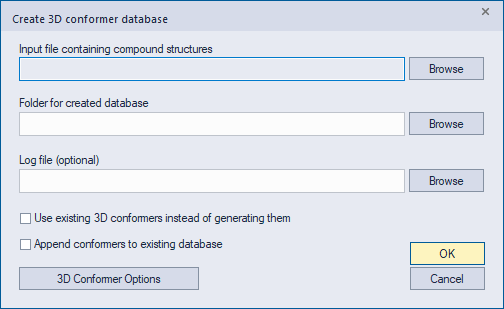
By clicking on the 3D Conformer Options button you can modify the settings related to 3D coordinate generation; these settings are described in the Preferences section.
The check box labeled "Use existing 3D conformers" allows you to generate a database from the 3D conformers contained in an existing SD file rather than from conformers generated by ADMET Predictor. This option requires that the conformers for each compound are contiguous within the file and that they have the identical atom order.
Conformer databases are stored on disk as a set of numbered files having the names db3d1.bin, db3d2.bin and so on. Each file contains a maximum of roughly one million conformers. The individual files are independent and can be moved to separate folders or distributed among different machines. However, a valid database requires that the files in a given folder start with db3d1.bin and that the numbering of subsequent files is contiguous.
To export the conformers from a 3D database to an SD file, use the menu item LIBRARY >> 3D >> Export. On the options dialog, select the database folder and the name of the output SD file.
Note that because 3D coordinates of hydrogen atoms are not stored in the database, the exported SD file will contain only heavy atoms. You can add hydrogen coordinates by opening the SD file in ADMET Predictor and using the menu item TOOLS >> 3D >> Add Hydrogens. This operation can also be performed using the command line via the script-file workflow for 3D coordinate generation (ms_generate_3d.txt).