

5.5. R List Explosion
R List explosion feature allows you to specify a scaffold with R group attachments and a series of corresponding substituent lists. ADMET Predictor then creates the combinatorial set of virtual compounds. The menu item DESIGN>>R List Explosion launches the Build Compounds dialog.
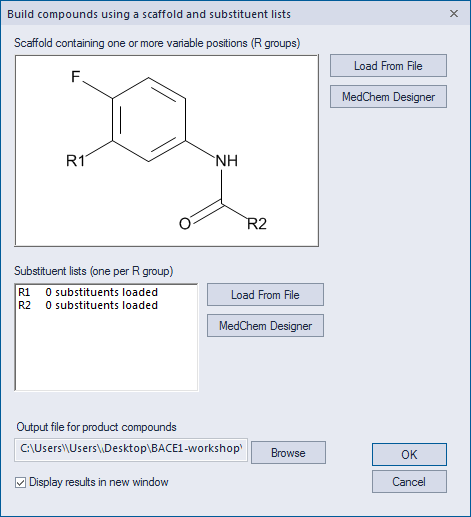
The dialog provides the option to load the scaffold from a file or to sketch it directly using MedChem Designer. In either case, the scaffold must contain at least one R group. Once the scaffold is loaded or drawn, the substituent list beneath the scaffold window is automatically updated with one list entry per R group in the scaffold. In the current example, the list shows that two R groups are present in the scaffold.
You must specify one list of substituents for each R group. To specify substituents, select an item from the list box and click on the Load From File button to select an SD or SMILES file. Alternately, you can click on the MedChem Designer button to sketch the substituents, then transfer them back to the dialog.
It is important to note that each R substituent, whether loaded from file or drawn with MedChem Designer, must have exactly one atom labeled as "R" or "U", to distinguish it as the attachment atom. For the case of SMILES files in particular, the atom must be labeled with "[U]", because "R" is not valid SMILES syntax.
The ADMET Predictor distribution includes a sample file named RList_Substituents.sdf that contains a small number of substituents. You can use this file as a template for creating your own substituent lists.