

5.6. Generate Fragments
The MedChem Studio module can perform fragmentation reactions on molecules to break them into smaller pieces. A classic example of this application is the technique known as “retrosynthetic combinatorial analysis procedure” (RECAP; Lewell 1998). MedChem Studio included a similar feature to construct new molecules using the fragments generated from molecule decomposition by replacing a scaffold or R groups.
To break compounds into fragments, choose the Generate Fragments option from the DESIGN menu. The posted dialog requires the user to select a file containing a list of fragmentation reactions; supported file formats include SMIRKS (SMK), MDL rxnfile (RXN) and CRF. Doing so will launch the Break molecule into fragments dialog.
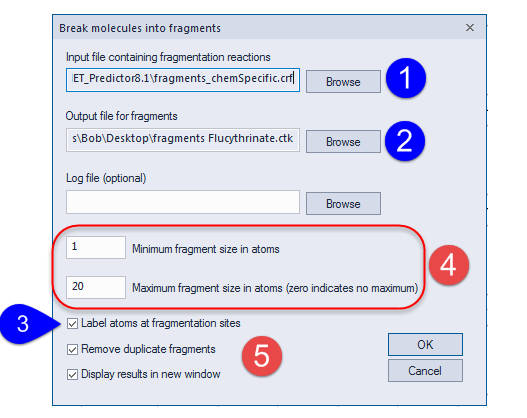
The Input file... field (1) specifies the path to a file containing a list of fragmentation rules. ADMET Predictor provides a file called fragments_chemSpecific.crf containing rules similar to those described in the RECAP paper; it is selected by default. You can modify that file or provide your own file containing customized fragmentation instructions. See the File Formats section for descriptions of required formats for reactions and reaction files.
You also need to specify an Output file for fragments (2). When output to a CTK file is selected, the fragments are annotated so they can be used for subsequent fragment assembly and replacement processes. Applying the default fragment generation rules to flucythrinate (from demo2d.smi) generates seven fragments, which are shown below; flucythrinate itself was read into the spreadsheet after opening the file.
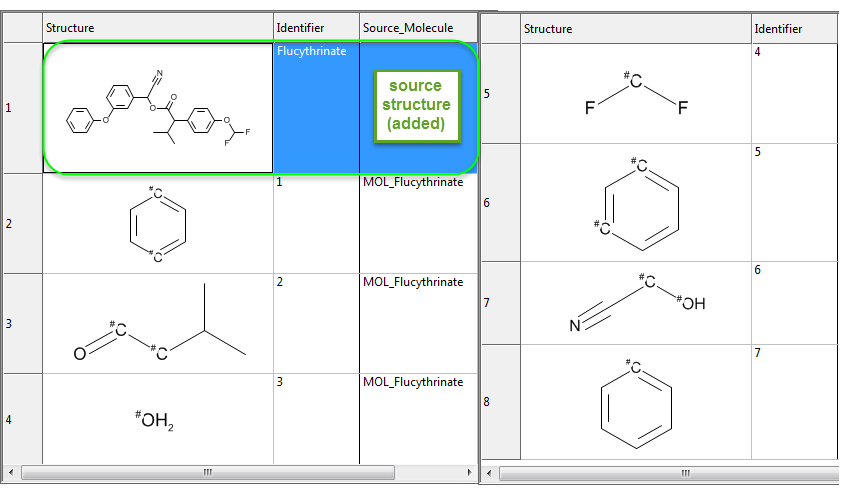
Fragments output to SD or SMILES files will lack that annotation and cannot be used for such processes. If Label atoms at fragmentation sites (3) is turned ON and SD or SMILES has been selected as the output, format, however, atoms connected by a bond that is cleaved will be tagged with the index of the cleavage reaction in the reaction file. The integer tag is written to the atomic mass field, such that an example fragment in SMILES notation might be [3N]CCC, where [3N] is the index of a fragmentation reaction that cleaves at that nitrogen position. This option is based on a similar feature in the original RECAP study; it lets you associate each fragment with the reaction that produced it. The figure illustrates the result of labeling fragmentation sites in an SD file generated from flucythrinate; again, the source structure has been added to the spreadsheet after the fact for illustrative purposes.
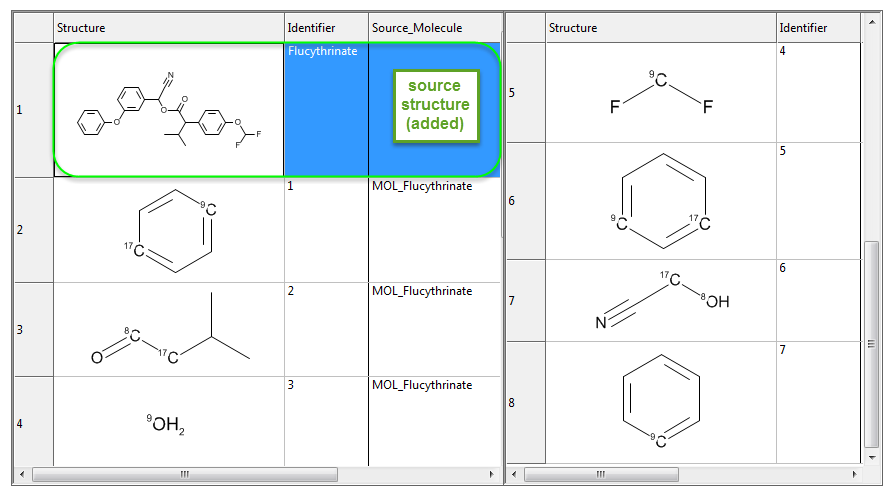
Note that setting Label atoms at fragmentation sites to ON has no effect on CTK output files.
Limits on the size of fragments generated are specified in area (4) of the Break molecule into fragments dialog. Before a fragmentation reaction is applied to a molecule or one of its fragments, the program checks to see whether any of the resulting fragments will have fewer than the specified number of atoms. If so, the reaction is not applied, and the molecule or fragment that was about to be cleaved is instead put directly in the final fragment list, assuming it does not violate any other filter criteria. Any fragments having more than the specified maximum number of atoms will not be written to the output file.
It is important to remember that whenever a larger fragment can be divided into smaller ones, only those smaller fragments, and not the larger one, are included in the final output file. Thus the final list of fragments is not exhaustive, but rather includes only the smallest possible fragments that can be generated from the original molecule.
You can also specify that duplicate fragments be removed and decide whether the final list of fragments will be displayed in a new ADMET Predictor window as well as being written to the specified output file (5). Specification of a log file is optional.