

Properties-Based Compound Filtering
This stage removes compounds unsuitable for modeling.
1. EDIT>>Query By Structure/Property… opens the Search using a query dialog, wherein you can create many different kinds of queries. In particular, you could filter the spreadsheet using one query at a time or you could generate a file containing multiple filters using the Query Wizard and save it to disk. For this exercise, use the query file that is already generated to filter the compounds.
2. Click on Load From File, then select the file chembl_compound_filter.cqf from the Tutorial\BACE folder in your applications data directory. Once loaded, the query will appear in the Search using a query dialog box as shown below:
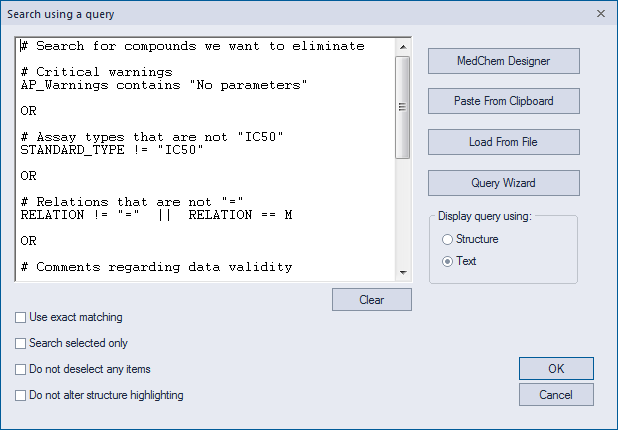
3. Click OK to start the search.
When the search is finished a total of 6,745 compounds will have been selected. These compounds should be discarded before continuing.
-
EDIT>>Delete to delete the selected compounds; click Yes in the warning prompt, if one appears.
A total of 955 compounds remain in the spreadsheet. The next stage in this tutorial is Cleaning the Data.