

1.14. HELP and Licensing
This chapter provides detail about items on the HELP menu and ADMET Predictor license management.
The HELP menu lets you access this manual, the Useful Tips window, and information about this program and your computer. It is also provides licensing information and lets you switch from Full to Viewer Mode and vice versa.
ADMET Predictor Help...
Launches the HTML version of this Manual, as will clicking on the "?" icon on the main toolbar.
Show Useful Tips Window...
Launches a window that lets you loop through a list of tips on how to use ADMET Predictor. You can scroll through the list and choose whether you want it to be opened every time you start up ADMET Predictor.
View License Status...
Launches the License status dialog, which shows how many seats are supported on your license server for each Simulations Plus, Inc., product as well as how many of those seats are currently available and what the expiration date is for each license. It also has a Viewer/Full button that lets you toggle between licensing modes.
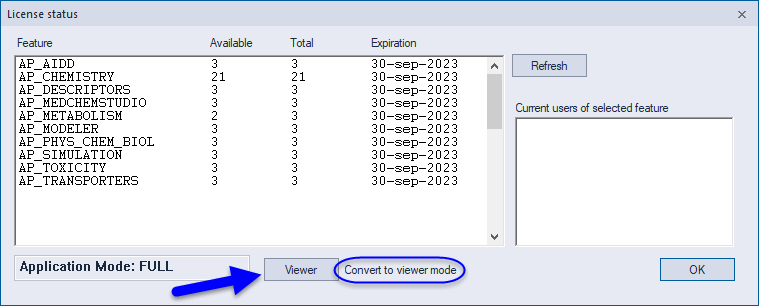
Going into Viewer Mode checks back in all licenses that have been checked out during a session and disables licensed features in the GUI. A notice will be posted in the status bar along the bottom of the main window whenever you are in Viewer Mode. and the Viewer/Full button's label will change.


View Computer Information...
Launches a System Information window.
View ADMET Error log...
Opens the most recently modified error log, if one exists.
About ADMET Predictor...
Indicates which version of the program you are running and provides a link to our website, www.simulations-plus.com. It would be helpful if you would include the version number of the product when reporting problems to us.