

4.4.2. Pair Generation Options
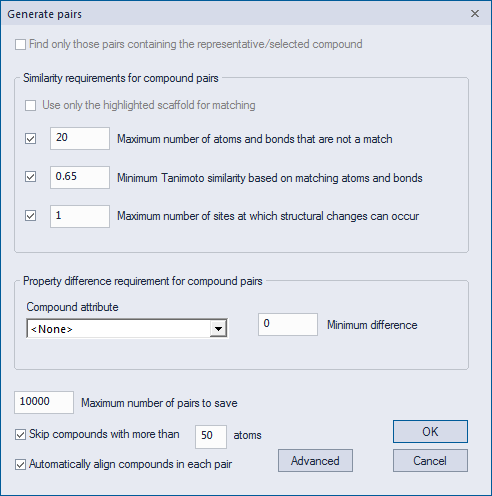
The Generate pairs dialog provides you with a number of options, as described below.
For illustration purposes, consider the following pair of molecules, highlighted as they would appear in the Pairs tab following pair generation:
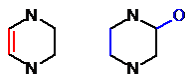
Maximum mismatches is the first of two possible similarity criteria. When activated, ADMET Predictor will accept two molecules as a valid pair only if the sum of non-matching atoms and bonds from the two molecules is less than or equal to the specified threshold. For example, in the molecules shown above there are a total of four mismatches: first, the highlighted double bond in the first molecule is a mismatch to the corresponding single bond in the second molecule, yielding a mismatch count of two; second, the highlighted hydroxyl substitution in the second molecule adds another mismatched bond and one mismatched atom, for a grand total of four mismatches. Therefore this pair of molecules would be accepted only if the maximum mismatch threshold was greater than or equal to four.
Minimum Tanimoto is the second of two possible similarity criteria. When activated, ADMET Predictor calculates for each candidate pair a value equal to the sum of matching atoms and bonds from the two molecules divided by the sum of both matching atoms and bonds and non-matching atoms and bonds from the two molecules. ADMET Predictor then accepts the candidate pair only if the calculated value is greater than or equal to the specified threshold. In the example molecules shown above, the sum of matching atoms and bonds is 11. This number is derived by taking any one of the molecules and counting the atoms and bonds that are not highlighted: in this example there are six such atoms and five such bonds, for a total of 11. Meanwhile, as noted in the earlier section, the sum of mismatched atoms and bonds is four. The Tanimoto value is therefore 11 / (11 + 4) = 0.733. Note that the Tanimoto similarity is always between 0 and 1, with 0 indicating perfect dissimilarity and 1 indicating perfect similarity. The benefit of having the Tanimoto similarity threshold in addition to the mismatch similarity threshold is with respect to smaller molecules. For a given fixed mismatch threshold, two small molecules right at the threshold are generally considered by chemists to be much less similar than two large molecules at the threshold. The Tanimoto similarity effectively normalizes for molecule size, so can be used to prevent small and dissimilar molecules from matching one another.
Maximum number of sites specifies the maximum number of distinct molecular sites at which structural changes can occur for each pair.
Property difference requirement allows you to specify a single molecule property and associated threshold value. If you decide to specify these optional values, ADMET Predictor will accept two molecules as a valid pair only if the absolute value of the difference in property values for the two molecules is greater than or equal to the specified threshold. If you do not specify which options to use, only the similarity criteria described above will be used to control the set of pairs that are generated; in that case, two molecules will be considered a valid pair if they are sufficiently similar in structure, without regard for their relative property values. In this way, the pair feature can act as an MCS-based similarity screening tool; see the section on similarity screening for more information.
Maximum pairs controls the maximum number of pairs that will be retained and that will be visible in the Pairs tab. By default, the pairs that are saved are those with the largest significance scores, where significance is the difference in property value divided by structural dissimilarity (one minus the Tanimoto similarity). If you have not specified a property value, then ADMET Predictor saves the pairs having the largest Tanimoto similarity scores. The Advanced dialog allows you to specify that ADMET Predictor simply save the pairs identified first; this option results in a faster calculation.
When Atom limit is checked ON, molecules having more than the specified number of atoms will be skipped. Checking this option can significantly reduce the required processing time.
The Advanced dialog has some additional options:
Matching rules specifies whether the atom matching rules should be extended to incorporate information about ring topology. The use of topology criteria generally results in more intuitive molecule alignments, since it prevents topological mismatches from occurring. However, this type of matching prevents ring atoms from ever matching non-ring (chain) atoms, which is more restrictive than some users may want; such users can therefore disable this option if desired.
Maximum pairs count offers two options: selecting Save the N most significant means that pairs with the largest significance scores will be saved, where significance is the difference in property value divided by structural dissimilarity (one minus similarity). Selecting Save the first N found means that those pairs found first will be saved; checking this option can significantly reduce the required processing time. If no property is specified, "significance" is simply equal to similarity.
MCS step limit allows you to specify a maximum step count for MCS calculations (in log units). Smaller numbers will result in faster calculations. The default setting of 8 should yield the correct MCS more than 95% of the time.
The newly generated pairs can be visualized in the Pairs tab. When this tab is activated, a new item called PAIRS appears in the main menu. This contains a number of options for further processing the pairs.