

Saving a Modified Lipinski Rule of 5 File
In this procedure, you add a modified version of the Lipinski Rule of 5 as new ADMET Risk model.
-
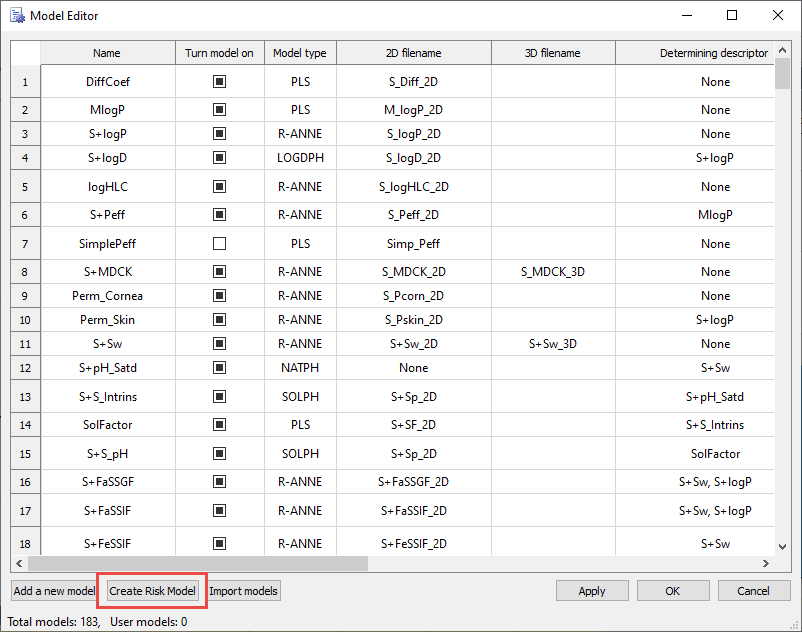
On the ADMET Predictor main menu, click TOOLS >> Model Editor... .
The Model Editor window opens.
-
Click Create Risk Model. The Risk Rule Editor: New Risk Model window opens.
-
On the Risk Rule Editor: New Risk Model window, type the following information, in the following order for each rule (labeled 1 - 5 in the figure).
-
ID: Hb, click Create, Descriptors/Properties: HBDH, click > button, type 5 in Lower (Threshold area); click on Add Value.
-
ID: LP, click Create, Descriptors/Properties: MlogP, click > button, type 4.15 in Lower (Threshold area); click on Add Value.
-
ID: NO, click Create, Descriptors/Properties: M_NO, click > button, type 10 in Lower (Threshold area); click on Add Value.
-
ID: Mw, click Create, Descriptors/Properties: MWt, click > button, type 500 in Lower (Threshold area); click on Add Value.
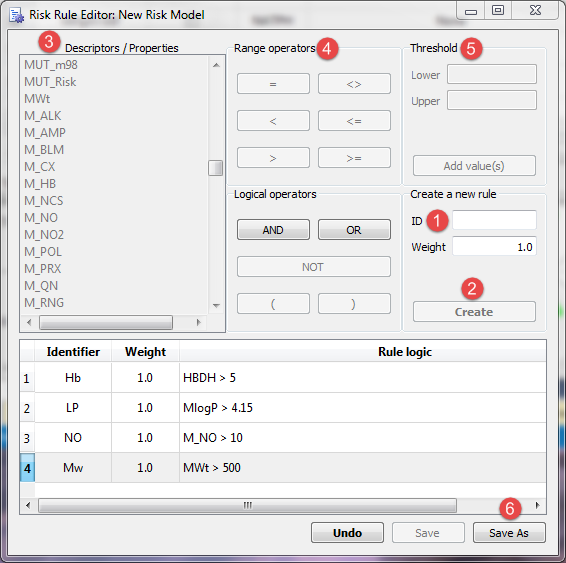
Click Save As (labeled 6) and type "test". The final file name will be test_Risk.ro5.
NOTE:
By default, the Risk Editor window saves new risk files to your application data folder.
-
Close the window by clicking on x in the right top corner.
-
In Model Editor scroll down to the end of the table. Your newly created risk rule test_Risk and accompanying test_Code should appear at the bottom of the table.