

2.3. Calculating ADMET Properties
ADMET property estimates can be generated in several ways in Predictor. One is to use the keyboard shortcut Ctrl+R. Another is via the menu system: DATA >> Calculate ADMET Properties (1). A third way is to click on the ADME icon on the toolbar (2). Any of these alternatives will launch the Calculate ADMET properties dialog (3).
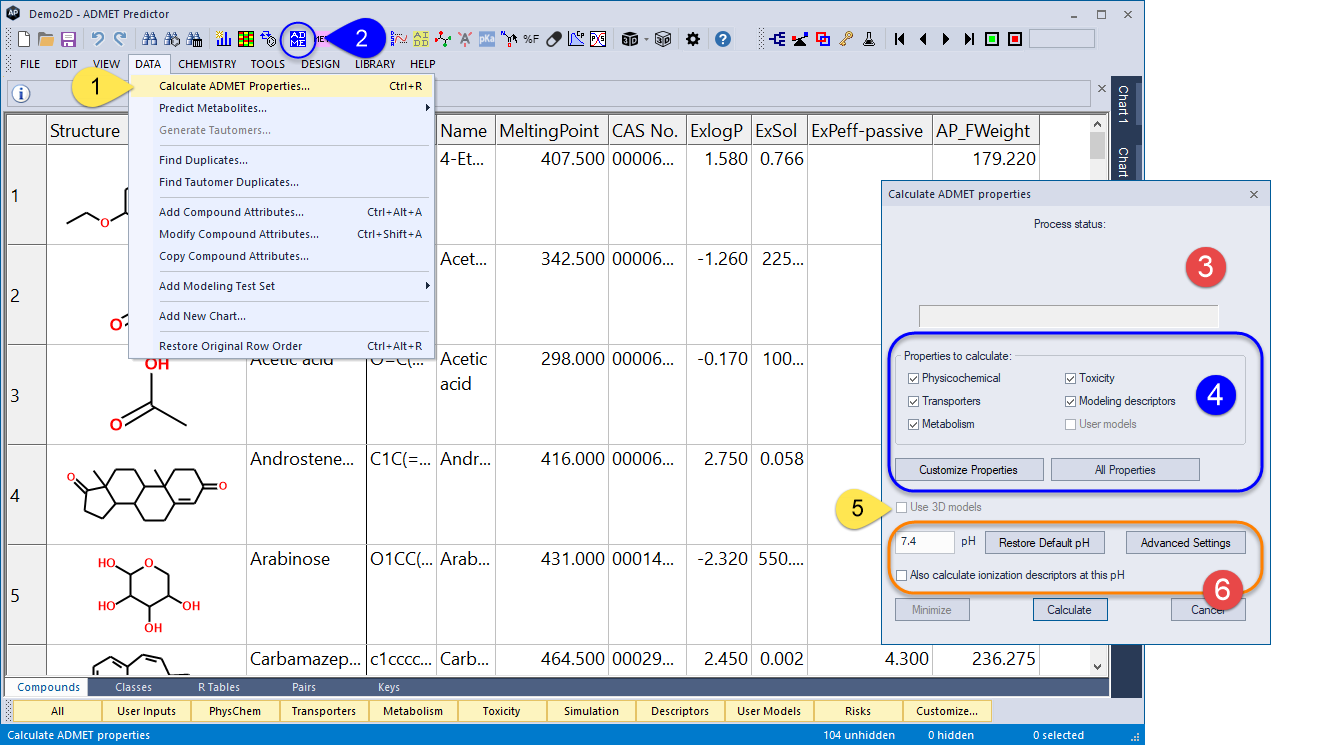
The Properties to calculate section of the dialog allows you to specify which combination of Attribute Groups you want to calculate (4). Only the module licenses required for the attributes you specify - all of them in the example above - will be checked out. They will then remain checked out for the duration of your ADMET Predictor session.
The Use 3D models option (5) determines whether or not the special 3D versions available for some models will be applied. These make use of 3D descriptors and so can only be evaluated when the structure files read in for the specified rows included 3D coordinates. If the box is left unchecked, the default 2D models will be used even if the structures are in 3D. Be aware that our models were trained on 3D structures generated using Corina; they may not perform as well on structures generated using other software.
The pH at which ADMET properties are to be predicted is 7.4 by default, though you may change it as well as other parameters by clicking on the Advanced Settings button (6), i.e., which microstates and pKa's to display and whether to include certain very weakly acidic basic or acidic groups in the calculations. The button will be highlighted in color if the default settings have been altered; this is to serve as a reminder that they have been changed, not as an indication that the current settings are somehow incorrect. Clicking on Restore Default pH will reset the pH field to the Default pH value stored in Preferences.
Simply changing the pH entry will change the pH at which a few properties (e.g., S+logD and S+S_pH) are calculated. ADMET Predictor's other built-in models, however, use descriptors evaluated at pH 7.4 as a reference pH, so deviations from that pH for a particular assay are accounted for implicitly. Hence turning Also calculate ionization descriptors at this pH ON will compromise the accuracy of the models we provide and is not recommended. The option is provided only to explore the effect of pH on the descriptors themselves.
Pressing the Calculate button will begin the model evaluation process.