

3.2.1. Variable Selection
The first step in model building is selection of the dependent variable and the descriptors (independent variables) to use in training your model. An example Variable Selection page is shown below:
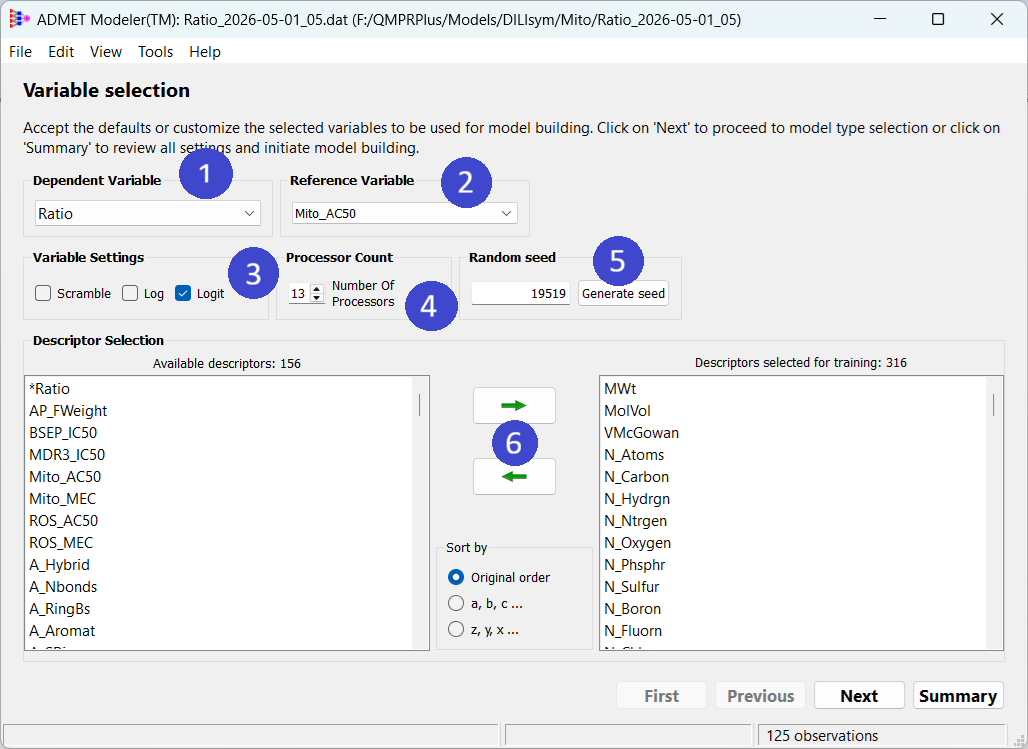
The Dependent Variable field (1) specifies which output variable the model will be trained against. If a Reference Variable is specified (2), a DELTA Model™ will be built using the difference between the two as the dependent variable. This is useful if you want to augment ADMET Predictor's global models with your own data for the same or a related endpoint. Other numeric attributes passed from the ADMET Predictor spreadsheet are available for use as descriptors and will appear in the Descriptor Selection panel; those that are supplied specifically for that purpose are selected by default.
If Log or Logit (3) is checked (only one at a time), the decimal logarithm or logit transform will be applied to the dependent variable before model building begins. If it is not checked, the dependent variable will be processed as is. We recommend that you use the log option when the ratio of the maximum to the minimum value is large and logit when the range spans the (0,1) open interval. Doing so will reduce the risk of model predictions being unduly biased by noise associated with too large large or too small values of the dependent variable. If a reference variable has been supplied and either option is checked, the model will be built on the difference between their transforms
The respective transform is only used for regression models; it will be ignored when building a classification model. Of course, the log and logit transforms can only be applied when all values of the dependent variable are numeric and greater than zero (and strictly less than one for logit). If any value of the selected dependent or reference variable is textual or less than zero, a warning will be posted when you try to build a model and you will have to return to the Variable Selection dialog. When you do, you will find that Log or Logit have been unchecked.
If Scramble is unchecked, then the selected dependent variable is used directly. If it is checked, then the values of the dependent variable will be shuffled at random. If you get a model with good performance after scrambling the target values, a model generated with the original values is unlikely to be robust even if its statistics "look good."
The Processor Count field (4) controls how many threads (logical as opposed to physical processors) will be used to build ensemble models. Training of the individual candidate networks (5×33=165 by default) is distributed across the number of processors specified. We recommend the default setting, which is one less than the number of logical processors on your machine. The appropriate setting depends on the session context - e.g., what other processes are running at the moment - rather than on the dataset. It is not associated with the model in any lasting way.
Increasing the Number of Processors will reduce the time it takes for model building, but will not affect the models produced. It is, however, likely to slow other processes running on your machine. This is particularly true if you set the Number of Processors to a value equal to or greater than the number of logical processors. Doing so will likely make the computer unresponsive and difficult to edit documents, search the Internet, or process e-mail.
Some model building activities - e.g., Kohonen map construction, K-means clustering, and descriptor selection - are not run in parallel and multi-threading will not speed them up. GA Descriptor Selection, in particular, will still be time consuming when the Per Cell sub-option is chosen.
The integer supplied in the Random seed field (5) affects many aspects of model building, including initial model weights and the partitioning of observations between the training pool and the test set. Models built with identical parameters and data but different random seeds will result in different models. If you wish to get identical models, use the same data and model building parameters. In almost all cases, the same model will be produced regardless of the grid settings used. The exception is when descriptors are selected by genetic algorithm (GA); in that case the grid specifications (e.g., neuron range, inputs range and step sizes) must also be kept constant if you want to reproduce results exactly.
Robust models built with the same parameters but different random seeds usually explore more or less the same region of the model space, so they can be expected to be broadly similar in the predictions they make if the data set is well behaved. Varying the random number seed while keeping other model building parameters fixed is a good way to determine how robust your models are.
The Descriptor Selection portion of the page contains all qualified numerical attributes transferred from your ADMET Predictor session; any with missing values or zero variance will have been omitted. The Descriptors selected for training list initially includes all attributes included in the Descriptors group, whereas others appear in the Available descriptors list. In particular, it will include any numerical attributes in the UserInputs group. Once you are familiar with the model building process, you may want to move some descriptors from one list to the other. Those shown in the Descriptors selected... list when you proceed to the Next or Summary page will form the descriptor pool that ADMET Modeler will consider incorporating as it builds models. It must contain at least one descriptor entry to build a model.
Use the arrows (6) to move highlighted variables between the lists. Select one or more entries in the Available descriptors list and press the upper button with an arrow pointing right to move them to the Descriptors selected list. Pressing the other button will move highlighted descriptors in the opposite direction.
You can recover the list of inputs that define a saved model using File >> Import Architecture. Doing so sets the contents of the Descriptors selected for training list to match the descriptors actually used as inputs in the model you select, provided those descriptors are available in the current data set. This can be useful if you want to retrain a model after adding, removing or modifying (e.g., by correcting a chemical structure) a few observations, or if you want to focus the descriptor pool on those that you already know work well.
Once variable selection is complete, you will be ready to move on to the Modeling Protocol page by pressing the Next button.