

ADMET Predictor version 14.0 introduced a new optional feature called HTPK Archiving; whereby detailed run information is saved after every HTPK simulation. This makes it much more convenient to maintain a record of your work - particularly when varying several of the input parameters - and to ensure reproducibility should you decide to run the same simulations at a later time. This feature is not enabled by default. To enable it, use the menu item FILE >> Preferences >> Simulation (see image below), check the "Enable archive" box and specify a folder where archive files will be saved.
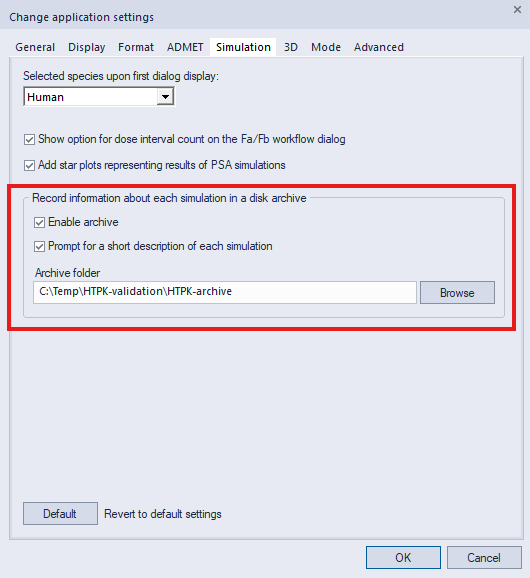
When this feature is activated, each simulation writes four files to the designated folder:
-
a text file containing compound structures, simulation results and per-compound inputs (both the values and associated attribute names)
-
an ACAT file (.txt extension) storing the relevant physiological parameters
-
an HIA file storing the relevant formulation parameters
-
a log file containing a brief summary, optional user notes and any error or warning messages generated during the run.
The names of all saved files are prefixed with the date and time of the simulation, for easy identification. An example prefix is 20260528_155420, the date is May 28, 2026, and the time is 15:54:20. The text file can be opened directly in ADMET Predictor, after which the spreadsheet should appear similar to when the simulation was first run. Furthermore, the HIA and ACAT files can be loaded into ADMET Predictor using the "Load HIA File" and "Load ACAT File" options under the FILE >> PK Simulation menu. This is important if you ever want to run the same simulation again, and loading the files is much more convenient than entering each setting manually within the primary and advanced HTPK dialogs.
The HTPK archive setting can also be set from the advanced HTPK simulation dialog: clicking the Application Settings button will display the Simulation settings page discussed earlier, where the archiving feature can be turned on and off. Furthermore, when archiving is active the Run button on the primary HTPK simulation dialog will have a blue font, so you will be aware of the current setting before starting the run.