

Pipeline Pilot™
Local installation of the ADMET Predictor component for Pipeline Pilot (version 2018 and higher) on a client
Installing the ADMET Predictor components for Pipeline Pilot follows the convention of installing other 3rd party components of integrated software products. The following procedure describes a typical client-side installation workflow and should be modified according to your particular configuration and requirements.
-
Save all component and protocol files listed below into a local folder:
ADMET Predictor (on Client).ppxml
ADMET Predictor (on Remote Host).ppxml
ADMET Predictor (on Server).ppxml
ADMET Predictor (on Client) example protocol.ppxml
ADMET Predictor Class Generation (on Client).xml
ADMET Predictor Class Generation (on Client) run example.xml
ADMET Predictor Analog Generation (on Client).xml
ADMET Predictor Analog Generation(on Client) run example.xml
ADMET Predictor Filter Molecules (on Client).xml
ADMET Predictor Filter Molecules (on Client) run example.xml -
Open Pipeline Pilot client, right click in the window where the components and/or protocols will be stored (most likely a default server folder indicated by the user name), and then click Import… option.
-
Navigate to the local folder chosen in step 1 and select all .ppxml and .xml files listed in step 1. This will import all components and protocols into your Pipeline Pilot client.
-
ADMET Predictor (on Client/Remote Host/Server) and ADMET Predictor SMILES Reader are the proper components (PP subprotocols) that can be incorporated into Pipeline Pilot pipelines. ADMET Predictor (on Client) example protocol is an example of how the components can be implemented. Please refer to the help text of all components for further details. After the components and protocols are imported, the Pipeline Pilot explorer window should look similar the figure below.
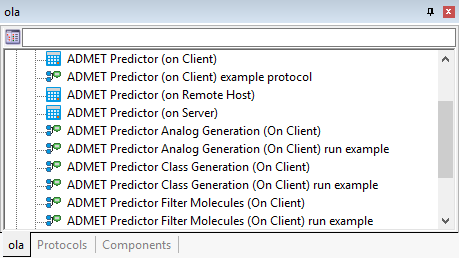
NOTE: The results are displayed in Internet Explorer browser. For your convenience, a separate component called Chrome HTML Table Viewer.ppxml is also included.
Global installation of the ADMET Predictor component on a Pipeline Pilot server (version 2018 and higher)
A local installation of the ADMET Predictor component satisfies needs of one user. However, larger teams sharing access to ADMET Predictor may benefit from central installation of the component accessible by everyone. For this purpose the packaged version of ADMET Predictor component and example protocol should be used instead individual XML files (simulationsplus.zip). Your Pipeline Pilot server administrator should be familiar with the procedure of installing packaged components, which involves the following: extract the contents of simulationsplus.zip to [PP_Install_Path]/apps, switch to directory containing pkgutil [PP_Install_Path]/bin (for MS Windows Servers) or [PP_Install_Path]/linux_bin (for Linux Servers) and issue the commands
To insure the path variables are set properly on Linux systems:
source ppvars.sh
To install
pkgutil -i simulationsplus/admetpredictor
To uninstall, under the same directory, issue the command
pkgutil -u simulationsplus/admetpredictor
To see a list of installed components, use
pkgutil -l
Important tips
The Client, Server and Remote Host components are used when ADMET Predictor is installed on the client (local) machine, Pipeline Pilot server machine, and a separate remote machine, respectively.
The Server and Remote Host components have the License Path option to specify the path to the Reprise license server. If the server or remote host machine itself serves as the license server, you should enter "@localhost" as the license path. If a separate machine serves as the license server, you should enter the relevant IP address and port number using the format "port_number@ip_address".
The Server and Remote Host components also have an option called Models Path. This is used for situations where ADMET Predictor is not able to correctly locate its support files. Ordinarily this folder is a subfolder within c:/Users/\<user_name>/AppData/Local, but since ADMET Predictor on a server is not ordinarily run by a named user, the folder may not exist. If you are having a problem getting either of these two components to work properly, this issue of the support-files location is the most likely reason. In this scenario, you can create an empty folder on the machine running ADMET Predictor, then enter the full path to that folder as the Models Path option. ADMET Predictor will then use this folder instead of the default one. There is no need to empty or otherwise modify this folder between Pipeline Pilot runs.
Running the Remote Host component requires additional steps. On the remote machine you must install ADMET Predictor and launch it at least once; running the program will create the required folder holding model files and important parameter files. On the remote machine you must create a folder to which the result files will be copied, and the path to this folder must be entered using the Pipeline Pilot interface option called Input File Directory. You must also install SSH Server software on the remote machine to allow file transfer to and from the Pipeline Pilot Server. One example software is OpenSSH Server. In some cases we have found that the SSH Server configuration file needs to be modified with the following lines in order for file transfer to be successful. Please contact your systems administrator about making these changes.
-Ciphers +3des-cbc
-KexAlgorithms +diffie-hellman-group1-sha1