

1.9.3. Find Duplicates
ADMET Predictor lets you find compound duplications by looking for either identical structures or by attribute (e.g., name) to another compound in the spreadsheet. This feature, which is available only in the Compounds tab, is activated using DATA>>Find Duplicates which launches the dialog Find duplicates shown below
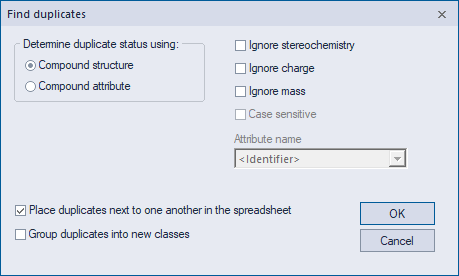
When duplicates are discovered, the default behavior is to move sets of duplicates the top of the spreadsheet. If any duplicates are found, a Duplicates column will appear (unless one already exists) that indicates which compounds duplicate others. Within each set of redundant rows, the one originally positioned highest position in the spreadsheet is not itself flagged as a duplicate. All unhidden duplicate rows in the spreadsheet will be selected when the operation is complete.
Note that partial matches of structure and attribute are not considered duplicates, so different salts of the same molecule will not register as structural duplicates until all unshared secondary components have been removed. Hence ammonium acetate and acetic acid will not be recognized as duplicates until the ammonium ion has been removed from the salt, leaving them with the same Structure attribute. Even then, they will not be recognized as duplicates until the acetate ion has been neutralized or Ignore charge has been checked ON in the Find duplicates dialog.
Keep in mind duplicate searches are run on all unhidden compounds, regardless of which rows have been selected.