

1.10.4. Compound Attributes Window
The Compound Attributes window lets you visualize compounds attributes for some molecular subset of interest. It can be launched in several ways:
-
By selecting one or more spreadsheet rows and choosing Display in Compound Properties Window from the right-click menu.
-
Using the keyboard shortcut Ctrl+W, provided you have selected one or more spreadsheet rows.
-
From histograms by clicking on any bar launches this window
-
From scatter plots using the Popup selection icon, provided you one or more data points have been selected.
The window is divided into three sections:
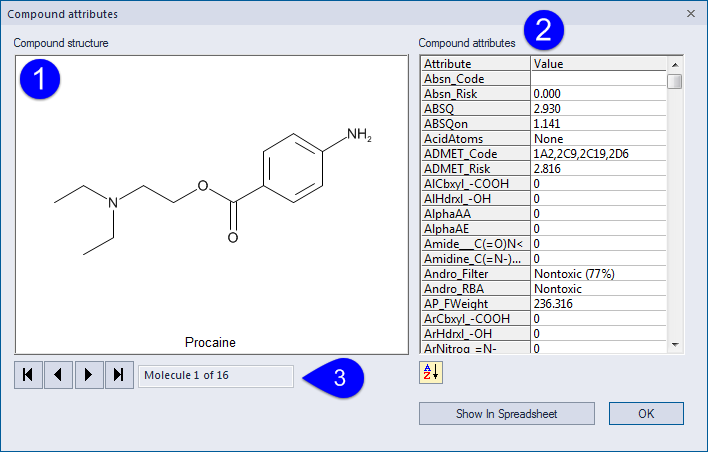
1. Compound structure.
2. Attributes associated with this compound. The AZ box at the bottom toggles the display between alphabetical sorting and sorting by attribute group. The default behavior is to display only those attributes that are currently shown in the main spreadsheet. This behavior can be changed by clicking the Props Window Settings button on the [Settings >> Display] dialog.
3. Navigation Arrows to move from one selected compound to another. A small box below the compound structure provides the total number of compounds that are present in the current selection.
The Show in Spreadsheet button scrolls the main application spreadsheet so that the designated compound appears at the very top. It does not change which rows are selected.