

1.10.3. Adding Other Attributes
New compound attributes can be added manually using DATA>>Add Compound Attributes. The Add Compound Attributes dialog that this launches provides several options for adding attributes. Note that attributes can be defined from within either the Compounds or Classes tab, and that attributes can be added to compounds in all rows or only to those in selected rows.
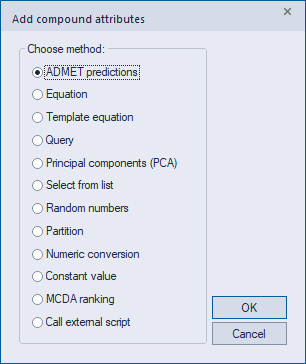
Selecting ADMET Predictions and clicking OK will launch the same Calculate ADMET properties dialog that DATA>>Calculate ADMET Properties does. For details of how to use that dialog, please consult Calculating ADMET Properties.
If the Equation option is selected, an Equation Editor will be launched that allows you to define new numeric attributes in terms of equations involving existing ones. You can save the equations you define to an external text file. Such files can be edited if desired and can be re-loaded into subsequent sessions of ADMET Predictor.
The Template Equation option is used to add one or more attributes based on user-defined equations contained in the file TemplateEquations.cqf, located in the AppData/Local support folder. The equations have a format similar to those created using the Equation option above (based on EQN Encoded queries, described here), but each can have one or more generic parameters that will later be mapped to fixed constants or existing numeric attributes (e.g., spreadsheet columns) using an options dialog. Please see the file TemplateEquations.cqf for details on the equation syntax, particularly for the generic parameters.
The Query option allows you to define an attribute using a query, either by typing one directly or by pasting it from a sketch application such as MedChem Designer or ChemDraw. Attribute values are then determined by running that query against compounds in the spreadsheet. For example, a substructure query may produce a compound attribute whose value is the number of unique occurrences of that substructure within the compound. This option is particularly useful for assigning numeric scores to compounds - e.g., counts of drug-like violations derived from particular substructures. The ADMET Predictor installation contains an example file called AttributeExamples.cqf that can serve as a reference for writing new queries of your own. You can load this file directly from the dialog that gets displayed when you select the Query option in the above window. Note that many of the example queries in this file assume that ADMET properties have already been calculated.
Principal Components (PCA) generates attributes based on principal components analyses of groups of descriptors related to size and shape, flexibility, ionization, charge, reactivity, polarity or hydrogen bonding. You can also specify either the maximum number of components to extract from each group or the maximum amount of variance to be accounted for. These can be useful for visualizing the property space covered by particular compound sets or classes.
Select from list lets you choose among several pre-defined molecular attributes, including counts of Hydrogen-bond donors and acceptors, rotatable bonds, rings, etc. It also includes an ADMET Risk Codes option that will produce binary (0 or 1) Risk Code attributes for each [ADMET_Risk rule]. The new attributes appear on the Risks attribute group tab at the bottom of the spreadsheet.
Random numbers creates an integer or real-valued attribute drawn at random from a uniform distribution spanning a range that you specify. An editable random number seed is provided.
The Partition option lets you create a new numeric attribute by partitioning an existing one into non-overlapping groups based on user-defined division lines. Compounds within each partition are assigned a user-defined numeric or text value.
Numeric Conversion converts text values into numeric ones according to a user-defined mapping. "Yes" and "No" can be converted to 1.0 and 0.0, for example.
Constant Value specifies a constant text or numeric value. For example, selected compounds can be assigned a numeric attribute named TEST_SET with a fixed value of 1. If an attribute by the given name already exists, the existing values will be replaced by the new one. By opting to only add attributes to selected rows, you can use this option in conjunction with the search and sorting tools in ADMET Predictor to generate your own partitions, e.g., for use in color-coding charts.
MCDA ranking option helps users select the most desirable compounds from a set by creating a multicriteria ranking based on one of two multicriteria decision analysis (MCDA) methodologies (Vikor or Topsis). The ranking is calculated based on an arbitrary number of objectives chosen from the available properties/attributes in the spreadsheet. The relative importance of each objective is defined by a weight, chosen by the user, which can be any number greater than or equal to zero. The user must also specify whether each criterion is a cost-type or gain-type. In the former case, lower values are preferred (i.e., the lower, the better); in the latter, higher values are preferred. As a result, the MCDA ranking, expressed in terms of integer numbers, is provided in a new column, which can be named as desired. The most optimal compound, as defined by the multiple criteria and their weights, will have an integer value of “0” while less optimal compounds will have higher integer values.
Call external script option enables calling an external script to calculate properties. This can be any script executable from the command line, accepting two arguments: the first argument is the name of the structure file (currently an SMI file) containing SMILES and optionally additional properties from the spreadsheet, and the second argument is the name of the output file with the newly calculated properties. Additionally, the user can specify the column name in which the new properties will be stored. The script should be implemented such that the output file contains a single column with the calculated property. The number of rows must match the number of rows in the structure file.