

Fingerprint clustering
The Fingerprint Clustering option is used to group together compounds that are similar on the basis of their descriptor (fingerprint) representations. Classes generated using this approach are not guaranteed to have large common substructures, since a given pair of compounds might have similar fingerprints but not a shared scaffold of significant size. Nevertheless, this is a common method of clustering chemical structures, and ADMET Predictor supports it.
The clustering algorithm uses a so-called agglomerative procedure in which each compound is initially placed into its own class. The two classes determined to be the most structurally similar are merged into a single class. Inter-class similarities are then re-calculated, and the two most similar classes are again merged. This iterative process continues until the largest inter-class similarity value is less than a user-specified threshold, at which point the algorithm terminates.
The Clustering options dialog allows the user to choose a number of parameters. The first of these is the set of descriptors (keys) that will serve as the basis for similarity calculations. The “Linear paths” option is based on unbranched fragments, and uses a fixed set of default parameters that cannot be modified by the user. The "ECFP" option is based on the popular extended-connectivity fingerprint keys. The “Load from query file” option allows the user to define keys using an arbitrary list of substructure fragments; see the sections on Query Files for further information. The “Load from matrix file” option allows the user to define keys using a text file containing the descriptor values for each compound. This file must be formatted such that compound names appear in the first column, and descriptor values appear in subsequent tab-delimited columns. The descriptor values generally consist of zero's and one's; non-binary values will be converted to binary automatically within ADMET Predictor by setting all non-zero values to one.
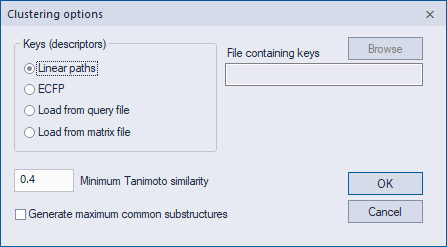
The second dialog option is the Tanimoto similarity threshold that determines when the iterative algorithm terminates. Once the similarity of the most similar pair of classes is below the threshold, the class merging process stops and the results are returned. Larger values of this parameter will result in a larger number of classes, smaller class sizes and greater similarity within classes. Smaller values will result in fewer classes, larger class sizes and less similarity within classes.
The final dialog option specifies whether class scaffolds should be defined using a maximum common substructures (MCS) algorithm. This is often a slow process, so the option is disabled by default.